
Overview
Tasks represent specific steps within a workflow. A workflow is a depiction of a sequence of operations, declared as work of a person, a group of persons, an organization of staff, or one or more simple or complex mechanisms.
A Workflow Task is a content item which has been assigned to a specific user, users with a specific role or members of a pool, indicating that a user needs to take action on the content item.
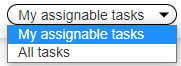
Under menu entry My tasks users may see
-
tasks directly assigned to them
-
tasks assignable to them
/*<![CDATA[*/ div.rbtoc1770892090626 {padding: 0px;} div.rbtoc1770892090626 ul {list-style: disc;margin-left: 0px;} div.rbtoc1770892090626 li {margin-left: 0px;padding-left: 0px;} /*]]>*/ Overview General Information Status Toolbar Task List Columns
General Information
User can enter any task, can navigate from there via option "view subject" towards the object currently in workflow and manage object.
User also has transition possibilities (to move the object further into the workflow or back to rework) depending on how the workflow is defined.
If users that are involved in the workflow need to be aware of developments, they may be notified via e-mail if this is defined in the workflow.
Status
Tasks may have the following technical status:
State : New
A "new" task is a task created by a workflow that has no assignee set.
New tasks do not appear in the "My tasks" of anybody.
New tasks appear in "My assignable tasks" of all users that are candidates to be assigned to the tasks.
State : Assigned
Tasks are in status "assigned" when an assignee is set for them (a particular actor that commits to work on the task).
Tasks in status "assigned" are displayed in My Tasks tab in task list.
Tasks in status "assigned" may also be shown in "My assignable tasks", allowing users to take tasks from other users (e.g. holiday case).
State : Finished
Tasks are in status "finished" after a workflow transition has been followed.
Finished tasks are not shown in any task list.
State : Closed
Tasks are in status "closed" after a delete action was performed on the task. After such an action the task and the workflow instance are both closed.
Closed tasks are not shown in any task list.
Initial State : Initial
The workflow may choose to automatically assign a task to the first member of the pool or may choose to let the task unassigned and by this the task will appear in the "My assignable tasks" of all users of the pool.
Tabular view
The Workflow Tasks are organized in a tabular view. This is the default view when the user enters the workspace area of dictionary tasks.
Toolbar
|
Button Icon |
Button Name |
Description |
|---|---|---|
|
|
Refresh |
Allows users to refresh the list of tasks. |
|
|
Show tasks |
Allows users to switch between assignable tasks and All tasks. Only users with role Dataadministrator can see all tasks. |
|
|
Show assigned tasks |
Allows users to also view tasks from the pools the user belogs to that are already assigned to a user. |
|
|
Manage selected |
Allows users to manage selected tasks (move them to the next workflow step). |
|
|
Assign to me |
Allows users to assign themselves a task. |
|
|
Reassign tasks |
Allows users to assign themselves a task that is already assigned to another user (e.g in case respective user is on holiday). |
|
|
Unassign tasks |
Allows users to remove a task assignment. |
|
|
Delete tasks |
Allows users to delete the selected tasks. |
|
|
Recalculate tasks pool |
Allows users to recalculate pool assignments for the selected tasks. |



Task List Columns
The following columns are available in the list of tasks:
|
Column Name |
Description |
|---|---|
|
ID |
Each task is assigned upon creation an ID that remains unchanged throughout the workflow. |
|
Assignee |
The user who is responsible for the task |
|
Task Description |
Description of the task |
|
Object ID |
ID of the object moved through the workflow. |
|
Object Name |
Name of the object moved through the workflow. |
|
Work package |
In case the objects are packetized in work packages, the ID of the work package. |
|
Creator |
The user whose action triggered the creation of the task. |
|
Creation date |
The date when the task was created. |
|
End date |
Displays the last possible date until when user can act on the assigned task. Some tasks have an end date. |
|
Open |
Indicates if task is open. Closed tasks are not displayed in list anymore. |
|
Suspended |
Indicates if task was suspended (because for example the workflow changed or for other reasons) |
|
Workflow |
Name of the workflow |
|
Task Type |
e.g. Error resolution, Release work package etc. |
|
Version |
Displays the version of the workflow. The version is incremented on change. |
|
Pool name |
The name of the pool responsible for the task. |
|
Workflow ID |
ID of the workflow instance |
|
Error Message |
In case of errors, displays the error |
|
Engine |
displays the version of the Workflow Engine - for example "1.0" or "2.0" |